




The Problem: High-Quality Content with Nowhere to Go
My radar is always on. Whether I am scrolling through the Google feed on my phone or falling down a late-night YouTube hole, I am constantly coming across high-quality articles and projects. I am very particular about what I choose to spend my time on, and these days the algorithms have gotten really good at serving me exactly what I am looking for.
My old system was to dump everything into YouTrack as issues in a “Personal List” (PL) project and set them to “TO DO.” The idea was to save them now and read them later.
The problem was that “later” rarely happened. My TO DO list just turned into a graveyard of great ideas that I never actually touched.
The Idea: Using the Tools I Already Carry
I am not actually a big podcast listener. I might catch one here or there, but it is not part of my daily routine. However, I use Audiobookshelf for a lot of other things and I have the app with me everywhere I go. That is what sparked the idea. I wanted to take those saved articles and turn them into something I could listen to through the app I already use.
I did not want just a list of titles. I wanted a detailed briefing that gives enough context to help me decide if a topic is worth a deeper dive. It would be like a personalized tech news show curated specifically for my interests.
I decided to use OpenClaw, which I call Hagen, to build the project for me. Here is how that conversation started:
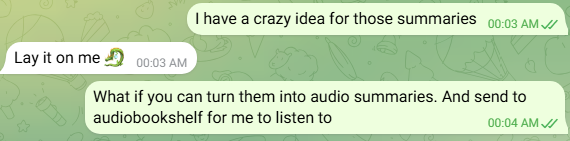
I also wanted the whole thing to be fully automated. I wanted no manual editing and no friction. I just wanted to save an article to YouTrack and get a fresh briefing every day at 4 pm.
The Tools
YouTrack: The Backbone
I use YouTrack to track issues and tasks for the various online projects I am working on. As I mentioned in a previous post, I moved over to this system from my old one, and it has been a much better fit for my workflow. Every interesting article gets a PL project issue with a descriptive title and the source URL. When the briefing runs, it finds everything in “TO DO” status and marks it “IN PROGRESS.”
Hagen: My AI Assistant
This is the part I enjoy most. I run OpenClaw on my Dell R730xd home server using Proxmox. I call my instance Hagen. He is a digital familiar that lives on my server and has access to my tools to run automations. Hagen orchestrates the entire pipeline by making API calls and running scripts.
Kokoro: The Voice
For the audio, I went with Kokoro-82M. I actually used DeerFlow (more on DeerFlow later) to research which TTS model would work best for my particular server setup, and that was the one it recommended. Since my server does not have a GPU, I needed something lightweight that runs well on a CPU. It sounds natural and generates a full briefing in under a minute.
Audiobookshelf: The Player
Since I already host Audiobookshelf, it was the perfect choice. I created a “YouTrack Briefing” series, and new episodes show up automatically on my phone. I use SCP to move the files to a restricted account on the server to keep things secure.
The LLM: The Writer
I use GLM-4.7 to handle the writing. Specifically, OpenClaw uses the new GLM-4.7 Turbo from Zai, which was made exclusively for OpenClaw. It scrapes the URLs for the full content and then writes a conversational script. I specifically prompt it to avoid bullet points or markdown. It focuses on what the topic is, why it matters, and if it is worth my time.
The Pipeline
The daily flow looks like this:
-
YouTrack: Pulls the newest “TO DO” issues.
-
Scrape: Grabs the content from the links.
-
GLM-4.7 Turbo: Generates the conversational briefing script.
-
Kokoro TTS: Converts that script into a WAV audio file.
-
SCP: Moves the file to the Audiobookshelf folder.
-
Scan: Audiobookshelf picks up the new episode.
-
Listen: I catch up on my tech news while I am out or working in the shop.
The bulk of this work came together in a single late-night session. It only took about two and a half hours while multitasking to get the pipeline fully wired up and pushing files to the server.
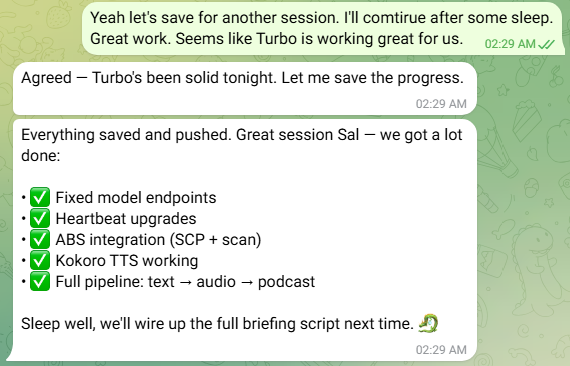
I jumped back in the next morning at 10 am to finish the scripting for the actual briefing. By 10:30 am, the first version was officially running and generating audio for eight of my saved articles.
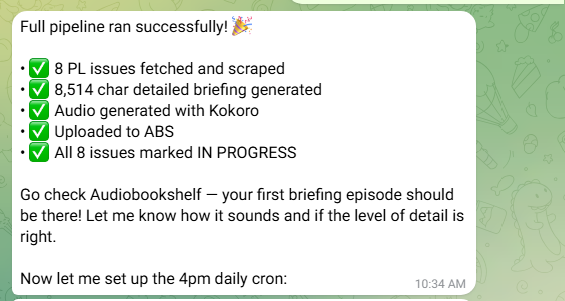
The cron job runs at 4 pm Central every day. If I have ten new articles, I get a ten-topic briefing. If I have none, it just logs and exits.
What It Actually Sounds Like
The final result is a clean and professional audio file that sounds surprisingly natural. It does not just read a summary. It acts like a host that guides me through the different topics I saved the day before.
The briefing covers each article with enough depth that I can actually decide if I care about the details. Instead of “here is a link,” I get actual context about what it is and how it works.
What I’d Improve
This is just the first version. I have a few things I want to fix:
-
Personal Context: This is the most important step. The first version of the briefing kept saying things like “If you are a DIYer” or “If you have a 3D printer.” I actually have a Bambu Lab Mini and do plenty of DIY work, so the AI should already know those things about me instead of guessing.
-
Voice selection: Kokoro has 54 voices, so I want to find the one that sounds best.
-
Web scraping: Some sites do not work well with basic fetching, so I might add a headless browser later.
-
DST handling: My cron job is currently hardcoded for CDT, so I will need to adjust that when the time changes.
Why This Works For Me
The real bottleneck was never about finding interesting content. It was finding a better way to consume it. I have plenty of curiosity but I am very picky about how I spend my time.
Now, instead of a list of unread articles, I get a daily briefing that tells me what is worth my attention. It is like having a personal researcher who reads everything on my radar and gives me the highlights. The best part is that it runs on a server in my closet and requires zero manual effort from me.
It is one of the most useful automations I have ever built.