




The Problem With v1
After running my personal tech briefing podcast for a few days, I noticed a gap in the workflow. The pipeline was great at getting articles into my ears. But then what happened next?
The original flow was simple:
Save article → Generate briefing → Listen → 🤷
After listening, I would hear about some cool tool or technique and think that I should try it. But there was no mechanism to capture that intent. The issue in YouTrack got marked “IN PROGRESS” and it just sat there forever. There was no follow-up, no action tracking, and nothing moved forward.
I was basically replacing my bookmark graveyard with a podcast graveyard. It was a different format but the same problem.
The Upgrades
Most of these upgrades were actually brainstormed while I was sitting in a drive-thru late at night. I was talking to Hagen (OpenClaw) on my phone. We mapped out the logic for the feedback loop and the scraping improvements before my food was even ready. It is amazing how much engineering you can get done through a voice interface while waiting for a burger.
1. Browser-Powered Web Scraping
The first pain point was practical. Some websites just do not play nice with basic HTTP fetching. JavaScript-rendered pages, bot detection, or dynamic content caused issues. My requests.get scraper was getting blank pages or blocks.
The fix was Crawl4AI, which runs as a self-hosted MCP server on my network that I use for other tools already. It is a real browser because it has Playwright under the hood. It handles all the stuff that trips up simple scrapers.
Now when the briefing script hits a GitHub README, a JavaScript-heavy blog, or a site with anti-bot protections, it gets the actual rendered content. The difference in briefing quality is noticeable. It provides more detail, more accurate summaries, and fewer “couldn’t scrape this URL” gaps.
2. MP3 Output with Metadata
The original pipeline generated WAV files which are uncompressed audio. A 3-minute briefing was 14MB. That is not ideal for a podcast.
I switched to MP3 at 128kbps via ffmpeg with embedded ID3 tags:
- Title: generated by the LLM based on the episode content (e.g., “Agentic AI Frameworks & Proxmox Backups”)
- Artist: “Hagen” (my AI assistant’s name)
- Album: “PL Briefing”
- Genre: “Podcast”
- Description: show notes built from the issue summaries
The result is the same audio quality at 0.1MB instead of 14MB. Audiobookshelf now picks up proper episode titles from the metadata instead of generic filenames.
3. Content-Based Episode Titles
Instead of “PL Briefing – 2026-03-29”, the LLM now generates a catchy title that captures the main theme of the briefing. It is part of the same summarization prompt. The first line comes back as TITLE: Agentic AI Frameworks & 3D Printing Breakthroughs and the rest is the script.
It is a small thing, but it makes browsing episodes in Audiobookshelf way more useful. “Proxmox Backups & Solar Sales Tools” tells me way more than “March 28 Briefing.”
4. Transcript Archive
Every briefing now saves a markdown transcript to scripts/youtrack/transcripts/2026-03-29.md. This serves a few purposes:
- Searchability: I can grep through past briefings to find when something was covered
- Regeneration: if I want to re-record with a different voice or fix something, I don’t need to re-query the LLM
- Reference: the transcript includes the episode title, date, and which issues were covered
5. Issue Comments — The Feedback Loop
This is the big one. After each briefing, every PL issue that was covered gets a comment like this:
🎙️ Covered in PL Briefing: Agentic AI Frameworks & 3D Printing Breakthroughs
What do you want to do with this?
• 🔨 Try it: implement or experiment
• ⏭️ Skip: not interested right now
• 📌 Save for later
This turns the PL project from a bookmark dump into an actual action pipeline. Each issue has a history that shows when it was saved and when it was covered in a briefing. It creates a place for me to decide what happens next.
If I hear about a backup tool I want to try, I can add a comment on the issue with my plan. If I am not interested, I close it. If I want to revisit it later, it stays in IN PROGRESS for the next briefing cycle.
6. Automated Follow-Up Reminders
My AI assistant Hagen runs a heartbeat check every 30 minutes. I added a new check so that if there are PL issues in “IN PROGRESS” status, I get a reminder.
This prevents the “set and forget” problem. Instead of issues languishing forever, I get periodic nudges asking if I want to do anything with the articles I heard about last week.
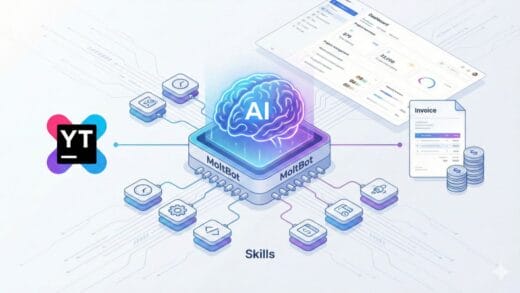
The New Pipeline
Save article to YouTrack (TO DO)

↓

Crawl4AI scrapes full content (browser-based)

↓

GLM generates briefing + episode title

↓

Kokoro TTS → MP3 with ID3 metadata

↓

SCP → Audiobookshelf

↓

Transcript saved to file

↓

Comment posted on each issue with link + action options

↓

Issues moved to IN PROGRESS

↓

I listen on my phone 🎧

↓

Decide: Try it? Skip it? Save for later?

↓

Heartbeat reminds me about stale IN PROGRESS issues

↓

Issues get completed or revisited ✅
The key difference is that the loop now closes. Instead of a one-way pipeline from save to listen and then forget, there is actual follow-through.
Why This Matters
Most “read it later” systems fail because they optimize for collection instead of consumption. You build up a list of 500 articles and feel overwhelmed. My original pipeline solved the consumption problem because I actually heard the content. But it did not solve the action problem.
Now, if I hear about a tool that could save me time, there is a clear path from “that’s interesting” to “I’m trying it.” The briefing plants the seed, and the follow-up system makes sure it does not die.
It is not just a podcast anymore. It is a personal knowledge management system with a really good audio interface.
What’s Next
- Personal Context: AI should already know those things about me instead of guessing.
- Voice experiments: Kokoro has 54 voices. I am going to try different ones for different content types.
- Crawl4AI upgrade: I am currently on v0.5.1 and newer versions have markdown generation and anti-bot modes.
- Topic categorization: auto-tag issues by topic so I can filter briefings by interest.
- Briefing length control: maybe shorter briefings for busy days and deeper dives when I have more time.
Same stack and a better pipeline. YouTrack, Crawl4AI, Kokoro-82M, GLM-4.7, Audiobookshelf, and OpenClaw. It is still running on a home server with no GPU and requires zero manual effort.